You’ve bought your domain name – great first step. But in reality, buying a domain name is just the beginning. What you do next determines whether your domain becomes a real asset or just sits unused.
I’ve seen many people purchase domain names with excitement, only to get stuck because they don’t know the next steps. This guide will walk you through exactly what to do after buying a domain name, in a clear and practical way.
Step 1: Verify Your Domain Ownership
After buying a domain name, you’ll usually receive a verification email from your registrar. This step is important because it confirms that you are the rightful owner of the domain.
If you skip this, your domain may not function properly or could even be suspended.
- Check your email inbox
- Click the verification link
- Ensure your contact details are correct
Step 2: Secure Your Domain
Your domain is a digital asset, so securing it should be a priority.
- Enable domain privacy protection (WHOIS privacy)
- Use a strong password for your registrar account
- Enable two-factor authentication (if available)
This helps prevent unauthorized access and protects your domain from misuse.
Step 3: Decide What You Want to Build
This is where many people get stuck after buying a domain name.
Ask yourself:
- Are you building a business website?
- Starting a blog?
- Launching a SaaS product?
- Holding the domain as an investment?
Your next steps depend entirely on your goal.
For example, a domain like AdProcessor.com clearly aligns with an AdTech product or service, while other domains may suit content platforms or marketplaces.
Step 4: Choose a Web Hosting Provider
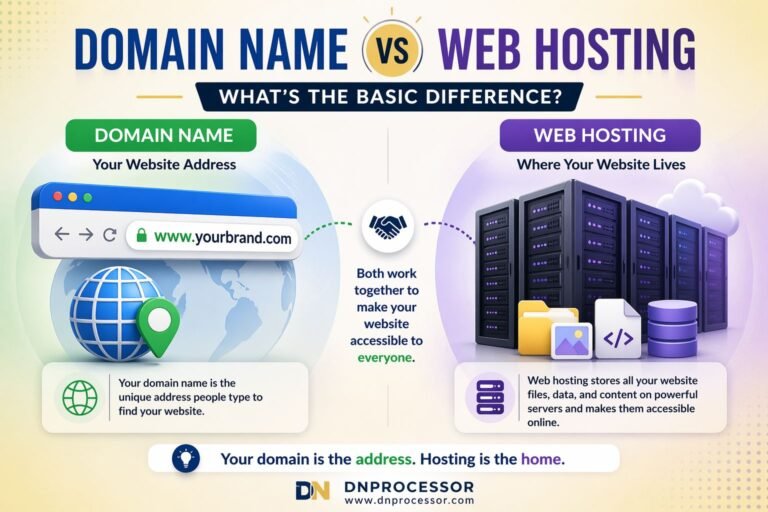
If you plan to build a website, you’ll need web hosting. Hosting is where your website files are stored, while your domain is how users access them.
If you’re unsure how this works, read our guide on domain name vs web hosting.
Choose a hosting provider based on:
- Performance and speed
- Customer support
- Ease of use
- Pricing
Step 5: Connect Your Domain to Hosting
Once you have hosting, you need to connect your domain to it.
This is done by updating your DNS (Domain Name System) settings.
Typically, you’ll:
- Get nameservers from your hosting provider
- Update them in your domain registrar dashboard
- Wait for propagation (can take a few hours)
Step 6: Set Up Your Website
Now comes the exciting part – building your website.
Most beginners use platforms like WordPress because it’s simple and flexible.
- Install WordPress via your hosting dashboard
- Choose a theme
- Add essential pages (Home, About, Contact)
At this stage, don’t aim for perfection – focus on getting something live.
Step 7: Create a Professional Email
A domain allows you to create custom email addresses like:
yourname@yourdomain.com
This looks far more professional than using generic email services.
Step 8: Plan Your Content or Business Strategy
Your domain becomes valuable when you build something meaningful on top of it.
Start with:
- Clear purpose of your website
- Target audience
- Content or product strategy
If you’re unsure what to build, explore our domain use cases to see how different domains can be turned into real business ideas.
Common Mistakes to Avoid
- Buying a domain and doing nothing with it
- Not renewing the domain on time
- Choosing the wrong hosting provider
- Ignoring security settings
- Overthinking instead of taking action
Conclusion
Buying a domain name is just the first step in your online journey. What really matters is how you use it.
By following the steps in this guide, you can turn your domain into a real digital asset—whether it’s a website, a business, or an investment.
Need Help Choosing or Using a Domain?
If you are exploring domain ideas or looking for a name that fits your business, DNProcessor can help you discover domain names with real-world potential. Browse our domain use cases or reach out through the Contact page to get started.
And if you are stuck after buying a domain name and need help, connect with our team. You can also reach me.